Explore Yugabyte SQL
After creating a free cluster and connecting to the cluster using Cloud Shell, you can start exploring YugabyteDB's PostgreSQL-compatible, fully-relational Yugabyte SQL API.
When you connect to your cluster using Cloud Shell with the YSQL API, the shell window incorporates a quick start guide, with a series of pre-built queries for you to run.
Run the tutorial
After entering your password, do the following to start the tutorial (creating a database is optional):
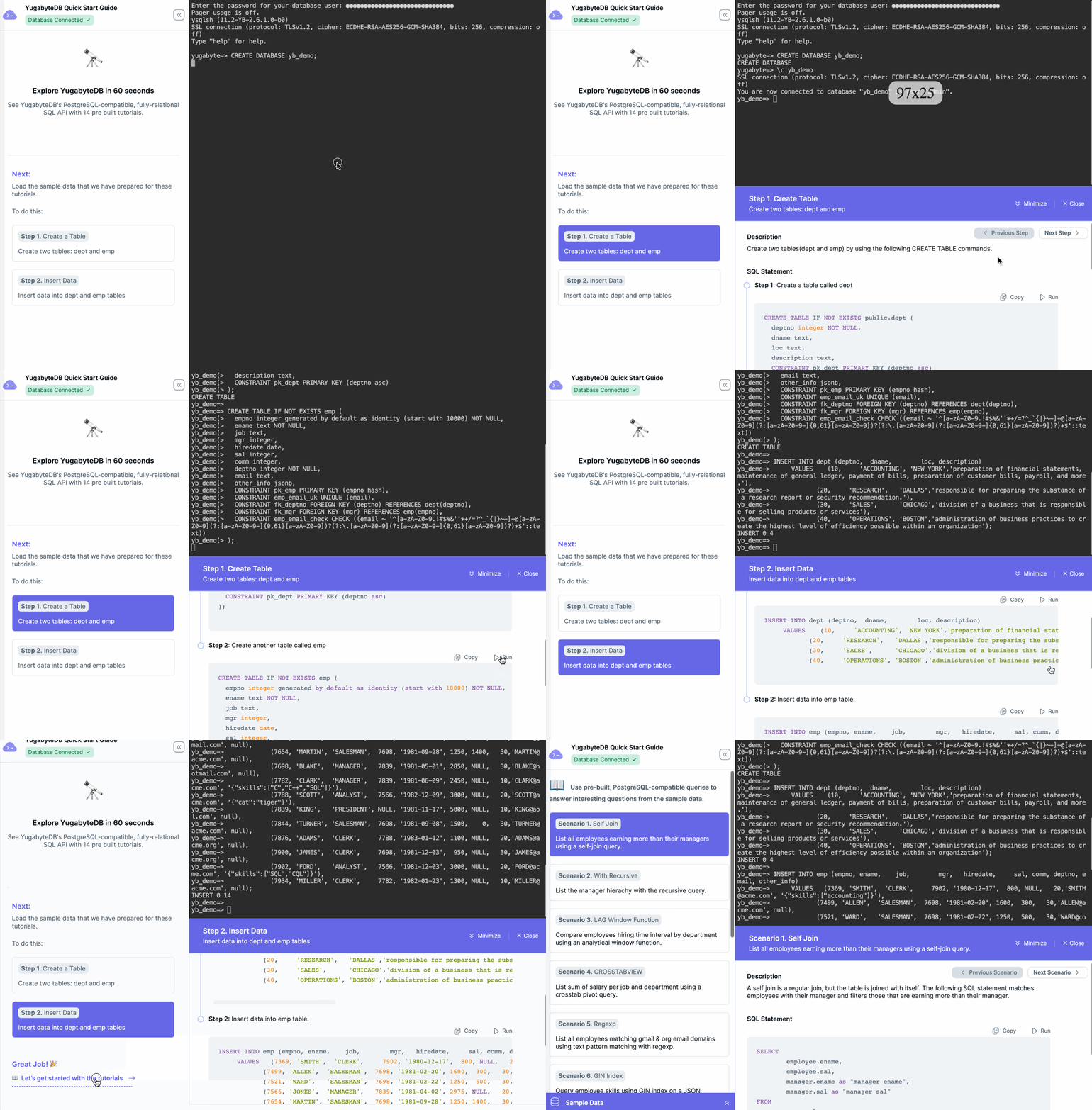
Create a database
While optional, it's good practice to create separate databases for different applications.
To create a database, enter the following command:
yugabyte=> CREATE DATABASE yb_demo;
Next, connect to the new database using the ysqlsh \c meta-command:
yugabyte=> \c yb_demo;
Create tables and insert data
Begin the tutorial by selecting the steps in the left navigation panel, then clicking the Run button for the corresponding SQL statements. The tutorial starts with the following tasks:
- Create a Table.
The tutorial database includes two tables:deptfor Departments, andempfor Employees. The employees table references the departments table through a foreign key constraint. The employees table also references itself through a foreign key constraint to ensure that an employee's manager is in turn an employee themselves. The table uses these constraints to ensure integrity of data, such as uniqueness and validity of email addresses. - Insert Data.
Data is added to the tables using multi-value inserts to reduce client-server round trips.
After you create the tables and insert the data, click Let's get started with the tutorials to begin the tutorial scenarios.
Quick start scenarios
The quick start includes the following scenarios:
| Scenario | Description |
|---|---|
| Self Join | List all employees earning more than their managers using a self-join query. |
| With Recursive | List the manager hierarchy using a recursive query. |
| LAG Window Function | Compare employee hiring time interval by department using an analytical window function. |
| CROSSTABVIEW | Display the sum of salary per job and department using a cross tab pivot query. |
| Regexp | List all employees matching Gmail and org email domains using regular expressions for text pattern matching. |
| GIN Index | Query employee skills using a GIN index on a JSON document. |
| Text Search Index | Create a GIN text search index on the description column and query for words. |
| Arithmetic Date Intervals | Find employees with overlapping evaluation periods using arithmetic date intervals. |
| SQL Update | Update the salary of all employees who are not managers and display the new results. |
| Prepared Statement | Get the salary for an employee using a prepared statement. |
| Stored Procedure | Transfer a commission from one employee to another using a stored procedure. |
| Trigger | Record the last update time of each row automatically. |
| Create Index | Create and analyze an index on the fly. |
To run this tutorial from your desktop shell, refer to Explore Yugabyte SQL in the Core Quick Start.