Schedule universe YCQL data backups
You can use YugabyteDB Anywhere to perform regularly scheduled backups of YugabyteDB universe data for all YCQL tables in a keyspace or only the specified YCQL tables.
To back up your universe YCQL data immediately, see Back up universe YCQL data.
Schedule a backup
You can schedule a backup of your universe YCQL data as follows:
-
Navigate to Universes.
-
Select the name of the universe for which you want to schedule backups.
-
Click the Tables tab and verify that backups are enabled. If disabled, click Enable Backup.
-
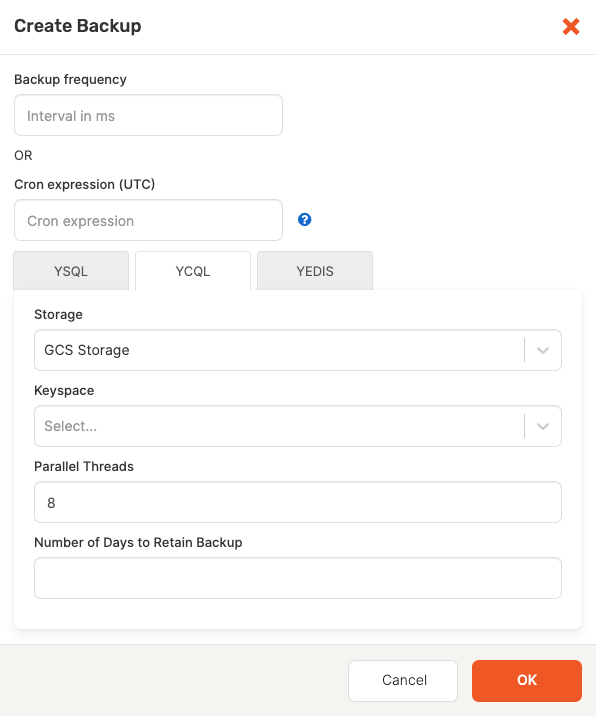
Select the Backups tab and then click Create Scheduled Backup to open the Create Backup dialog shown in the following illustration:
,br> -
Enter the Backup frequency (interval in milliseconds) or a Cron expression (UTC)*. For details on valid
cronexpression formats, hover over the question mark (?) icon. -
Select the YCQL tab and enter values for the following fields:
- Storage: Select the storage type:
GCS Storage,S3 Storage, orNFS Storage. - Keyspace: Select your keyspace from the drop-down list of predefined keyspaces.
- Tables to backup: Select either All Tables in Keyspace or the specific tables to back up.
- Parallel Threads: Enter or select the number of threads. The default is
8. - Number of Days to Retain Backup: Default is unspecified which means to retain indefinitely.
- Storage: Select the storage type:
-
Click OK.
The initial backup begins immediately.
Subsequent backups are created based on the value you specified for Backup frequency or Cron expression.
Disable scheduled backups
You can temporarily disable all scheduled backups as follows:
- Navigate to your universe and select Tables.
- Click Disable Backups.
Delete a scheduled backup
You can permanently remove a scheduled backup, as follows:
- Navigate to your universe and select the Backups tab.
- Find the scheduled backup and click Options.
- Click Delete schedule.