Join us on YugabyteDB Community Slack
Star us on
Get Started
Slack
GitHub
Get Started
v2.13 (preview) v2.12 (stable) v2.8 (earlier version) v2.6 (earlier version) v2.4 (earlier version) Unsupported versions
  • YUGABYTEDB CORE
    • Quick start
      • 1. Install YugabyteDB
      • 2. Create a local cluster
      • 3. Explore distributed SQL
      • 4. Build an application
        • Java
        • Node.js
        • Go
        • Python
        • Ruby
        • C#
        • PHP
        • C++
        • C
        • Scala
        • Rust
    • Explore
      • SQL features
        • SQL Feature Support
        • PostgreSQL Compatibility
        • Foreign Data Wrappers
        • Schemas and Tables
        • Data Types
        • Data Manipulation
        • Queries and Joins
        • Expressions and Operators
        • Stored Procedures
        • Triggers
        • Advanced features
          • Cursors
          • Table Partitioning
          • Views
          • Savepoints
          • Collations
        • Going beyond SQL
          • Follower reads
          • Tablespaces
        • PostgreSQL extensions
      • Fault tolerance
      • Horizontal scalability
        • Scaling Transactions
        • Sharding Data
      • Transactions
        • Distributed Transactions
        • Isolation Levels
        • Explicit Locking
      • Indexes and Constraints
        • Primary keys
        • Foreign keys
        • Secondary indexes
        • Unique indexes
        • Partial indexes
        • Expression indexes
        • Covering indexes
        • GIN indexes
        • Other constraints
      • JSON support
      • Multi-region deployments
        • Sync replication (3+ regions)
        • Async Replication (2+ regions)
        • Row-Level Geo-Partitioning
        • Read replicas
      • Query tuning
        • Introduction
        • Get query statistics using pg_stat_statements
        • Viewing live queries with pg_stat_activity
        • Analyzing queries with EXPLAIN
        • Optimizing YSQL queries using pg_hint_plan
      • Cluster management
        • Point-in-time recovery
      • Change data capture (CDC)
        • Debezium connector
        • Java CDC console
      • Security
      • Observability
        • Prometheus Integration
        • Grafana Dashboard
    • Drivers and ORMs
      • Java
        • JDBC drivers
        • Hibernate ORM
        • Supported versions
      • Go
        • Go drivers
        • Go ORMs
        • Supported versions
      • C#
        • C# drivers
        • C# ORMs
        • Supported versions
      • NodeJS
        • NodeJS drivers
        • NodeJS ORMs
        • Supported Versions
      • Python
        • Python drivers
        • Python ORMs
        • Supported versions
    • Develop
      • Learn app development
        • 1. SQL vs NoSQL
        • 2. Data modeling
        • 3. Data types
        • 4. ACID transactions
        • 5. Aggregations
        • 6. Batch operations
        • 7. Date and time
        • 8. Strings and text
        • 9. TTL for data expiration
      • Real-world examples
        • E-Commerce app
        • IoT fleet management
      • Explore sample apps
      • Best practices
      • Cloud-native development
        • Codespaces
        • Gitpod
    • Migrate
      • Migration process overview
      • Migrate from PostgreSQL
        • Convert a PostgreSQL schema
        • Migrate a PostgreSQL application
        • Export PostgreSQL data
        • Prepare a cluster
        • Import PostgreSQL data
        • Verify Migration
    • Deploy
      • Deployment checklist
      • Manual deployment
        • 1. System configuration
        • 2. Install software
        • 3. Start YB-Masters
        • 4. Start YB-TServers
        • 5. Verify deployment
      • Kubernetes
        • Single-zone
          • Open Source
          • Amazon EKS
          • Google Kubernetes Engine
          • Azure Kubernetes Service
        • Multi-zone
          • Amazon EKS
          • Google Kubernetes Engine
        • Multi-cluster
          • Google Kubernetes Engine
        • Best practices
        • Connect Clients
      • Docker
      • Public clouds
        • Amazon Web Services
        • Google Cloud Platform
        • Microsoft Azure
      • Multi-DC deployments
        • Three+ data center (3DC)
        • Asynchronous Replication
        • Read replica clusters
    • Benchmark
      • TPC-C
      • sysbench
      • YCSB
      • Key-value workload
      • Large datasets
      • Scalability
        • Scaling queries
      • Resilience
        • Jepsen testing
      • Performance Troubleshooting
    • Secure
      • Security checklist
      • Enable Authentication
        • Enable User Authentication
        • Configure ysql_hba_conf_csv
      • Authentication Methods
        • Password Authentication
        • LDAP Authentication
        • Host-Based Authentication
        • Trust Authentication
      • Role-Based Access Control
        • Overview
        • Manage Users and Roles
        • Grant Privileges
        • Row-Level Security (RLS)
        • Column-Level Security
      • Encryption in Transit
        • Create server certificates
        • Enable server-to-server encryption
        • Enable client-to-server encryption
        • Connect to Clusters
        • TLS and authentication
      • Encryption at rest
      • Column-level encryption
      • Audit Logging
        • Configure Audit Logging
        • Session-Level Audit Logging
        • Object-Level Audit Logging
      • Vulnerability disclosure policy
    • Manage
      • Back up and restore
        • Back up data
        • Restore data
        • Point-in-time recovery
        • Snapshot and restore data
      • Migrate data
        • Bulk import
        • Bulk export
      • Change cluster configuration
      • Diagnostics reporting
      • Upgrade a deployment
      • Grow cluster
    • Troubleshoot
      • Troubleshooting
      • Cluster level issues
        • YCQL connection issues
        • YEDIS connection Issues
        • Recover tserver/master
        • Replace a failed YB-TServer
        • Replace a failed YB-Master
        • Manual remote bootstrap when a majority of peers fail
      • Node level issues
        • Check servers
        • Inspect logs
        • System statistics
        • Disk failure
        • Common error messages
    • Contribute
      • Core database
        • Contribution checklist
        • Build the source
        • Configure a CLion project
        • Run the tests
        • Coding style
  • YUGABYTEDB ANYWHERE
    • Overview
      • Install
      • Configure
    • Install YugabyteDB Anywhere
      • Prerequisites
      • Prepare the environment
      • Install software
      • Prepare nodes (on-premises)
      • Uninstall software
    • Configure YugabyteDB Anywhere
      • Create admin user
      • Configure the cloud provider
      • Configure the backup target
      • Configure alerts
    • Create deployments
      • Multi-zone universe
      • Multi-region universe
      • Multi-cloud universe
      • Read replica cluster
      • Asynchronous replication
    • Manage deployments
      • Start and stop processes
      • Eliminate an unresponsive node
      • Recover a node
      • Enable high availability
      • Edit configuration flags
      • Edit a universe
      • Delete a universe
      • Configure instance tags
      • Upgrade YugabyteDB software
      • Migrate to Helm 3
    • Back up universes
      • Configure backup storage
      • Back up universe data
      • Restore universe data
      • Schedule data backups
    • Security
      • Security checklist
      • Customize ports
      • LDAP authentication
      • Authorization
      • Create a KMS configuration
      • Enable encryption at rest
      • Enable encryption in transit (TLS)
      • Network security
    • Alerts and monitoring
      • Alerts
      • Live Queries dashboard
      • Slow Queries dashboard
    • Troubleshoot
      • Install and upgrade issues
      • Universe issues
    • Administer YugabyteDB Anywhere
      • Back up YugabyteDB Anywhere
      • Authenticate with LDAP
    • Upgrade YugabyteDB Anywhere
      • Upgrade using Replicated
  • YUGABYTEDB MANAGED
    • Overview
    • Quick start
      • Create a free cluster
      • Connect to the cluster
      • Explore distributed SQL
      • Build an application
        • Before you begin
        • Java
        • Go
        • Python
        • Node.js
        • C
        • C++
        • C#
        • Ruby
        • Rust
        • PHP
    • Deploy clusters
      • Planning a cluster
      • Create a free cluster
      • Create a standard cluster
      • VPC network
        • Overview
        • Set up a VPC network
        • VPCs
        • Peering Connections
    • Secure clusters
      • IP allow lists
      • Database authorization
      • Add database users
      • Encryption in transit
      • Audit account activity
    • Connect to clusters
      • Cloud Shell
      • Client shell
      • Connect applications
    • Alerts and monitoring
      • Alerts
      • Performance metrics
      • Live queries
      • Slow YSQL queries
      • Cluster activity
    • Manage clusters
      • Scale and configure clusters
      • Backup and restore
      • Maintenance windows
      • Create extensions
    • Administration and billing
      • Manage account access
      • Manage billing
      • Cluster costs
    • Example applications
      • Connect a Spring application
      • Connect a YCQL Java application
      • Hasura Cloud
      • Deploy a GraphQL application
    • Security architecture
      • Security architecture
      • Shared responsibility model
    • Troubleshoot
    • YugabyteDB Managed FAQ
    • What's new
  • INTEGRATIONS
    • Apache Kafka
    • Apache Spark
    • Debezium
    • Django REST framework
    • Entity Framework
    • Flyway
    • GORM
    • Hasura
      • Application Development
      • Benchmarking
    • JanusGraph
    • KairosDB
    • Liquibase
    • Metabase
    • Presto
    • Prisma
    • Sequelize
    • Spring Framework
      • Spring Data YugabyteDB
      • Spring Data JPA
      • Spring Data Cassandra
    • SQLAlchemy
    • WSO2 Identity Server
    • YSQL Loader
    • YugabyteDB JDBC driver
  • REFERENCE
    • Architecture
      • Design goals
      • Key concepts
        • Universe
        • YB-TServer Service
        • YB-Master Service
      • Core functions
        • Universe creation
        • Table creation
        • Write IO path
        • Read IO path
        • High availability
      • Layered architecture
      • Query layer
        • Overview
      • DocDB transactions layer
        • Transactions overview
        • Transaction isolation levels
        • Explicit locking
        • Read Committed
        • Single-row transactions
        • Distributed transactions
        • Transactional IO path
      • DocDB sharding layer
        • Hash & range sharding
        • Tablet splitting
        • Colocated tables
      • DocDB replication layer
        • Replication
        • xCluster replication
        • Read replicas
        • Change data capture (CDC)
      • DocDB storage layer
        • Persistence
        • Performance
    • APIs
      • YSQL
        • The SQL language
          • SQL statements
            • ABORT
            • ALTER DATABASE
            • ALTER DEFAULT PRIVILEGES
            • ALTER DOMAIN
            • ALTER FOREIGN DATA WRAPPER
            • ALTER FOREIGN TABLE
            • ALTER GROUP
            • ALTER POLICY
            • ALTER ROLE
            • ALTER SEQUENCE
            • ALTER SERVER
            • ALTER TABLE
            • ALTER USER
            • ANALYZE
            • BEGIN
            • CALL
            • COMMENT
            • COMMIT
            • COPY
            • CREATE AGGREGATE
            • CREATE CAST
            • CREATE DATABASE
            • CREATE DOMAIN
            • CREATE EXTENSION
            • CREATE FOREIGN DATA WRAPPER
            • CREATE FOREIGN TABLE
            • CREATE FUNCTION
            • CREATE GROUP
            • CREATE INDEX
            • CREATE MATERIALIZED VIEW
            • CREATE OPERATOR
            • CREATE OPERATOR CLASS
            • CREATE POLICY
            • CREATE PROCEDURE
            • CREATE ROLE
            • CREATE RULE
            • CREATE SCHEMA
            • CREATE SEQUENCE
            • CREATE SERVER
            • CREATE TABLE
            • CREATE TABLE AS
            • CREATE TRIGGER
            • CREATE TYPE
            • CREATE USER
            • CREATE USER MAPPING
            • CREATE VIEW
            • DEALLOCATE
            • DELETE
            • DO
            • DROP AGGREGATE
            • DROP CAST
            • DROP DATABASE
            • DROP DOMAIN
            • DROP EXTENSION
            • DROP FOREIGN DATA WRAPPER
            • DROP FOREIGN TABLE
            • DROP FUNCTION
            • DROP GROUP
            • DROP MATERIALIZED VIEW
            • DROP OPERATOR
            • DROP OPERATOR CLASS
            • DROP OWNED
            • DROP POLICY
            • DROP PROCEDURE
            • DROP ROLE
            • DROP RULE
            • DROP SEQUENCE
            • DROP SERVER
            • DROP TABLE
            • DROP TRIGGER
            • DROP TYPE
            • DROP USER
            • END
            • EXECUTE
            • EXPLAIN
            • GRANT
            • IMPORT FOREIGN SCHEMA
            • INSERT
            • LOCK
            • PREPARE
            • REASSIGN OWNED
            • REFRESH MATERIALIZED VIEW
            • RELEASE SAVEPOINT
            • RESET
            • REVOKE
            • ROLLBACK
            • ROLLBACK TO SAVEPOINT
            • SAVEPOINT
            • SELECT
            • SET
            • SET CONSTRAINTS
            • SET ROLE
            • SET SESSION AUTHORIZATION
            • SET TRANSACTION
            • SHOW
            • SHOW TRANSACTION
            • TRUNCATE
            • UPDATE
            • VALUES
          • WITH clause
            • WITH clause—SQL syntax and semantics
            • recursive CTE
            • case study—traversing an employee hierarchy
            • traversing general graphs
              • graph representation
              • common code
              • undirected cyclic graph
              • directed cyclic graph
              • directed acyclic graph
              • rooted tree
              • Unique containing paths
              • Stress testing find_paths()
            • case study—Bacon Numbers from IMDb
              • Bacon numbers for synthetic data
              • Bacon numbers for IMDb data
        • Data types
          • Array
            • array[] constructor
            • Literals
              • Text typecasting and literals
              • Array of primitive values
              • Row
              • Array of rows
            • FOREACH loop (PL/pgSQL)
            • array of DOMAINs
            • Functions and operators
              • ANY and ALL
              • Array comparison
              • Array slice operator
              • Array concatenation
              • Array properties
              • array_agg(), unnest(), generate_subscripts()
              • array_fill()
              • array_position(), array_positions()
              • array_remove()
              • array_replace() / set value
              • array_to_string()
              • string_to_array()
          • Binary
          • Boolean
          • Character
          • Date and time
            • Conceptual background
            • Timezones and UTC offsets
              • Catalog views
              • Extended_timezone_names
                • Unrestricted full projection
                • Real timezones with DST
                • Real timezones no DST
                • Synthetic timezones no DST
              • Offset/timezone-sensitive operations
                • Timestamptz to/from timestamp conversion
                • Pure 'day' interval arithmetic
              • Four ways to specify offset
                • Name-resolution rules
                  • 1 case-insensitive resolution
                  • 2 ~names.abbrev never searched
                  • 3 'set timezone' string not resolved in ~abbrevs.abbrev
                  • 4 ~abbrevs.abbrev before ~names.name
                  • Helper functions
              • Syntax contexts for offset
              • Recommended practice
            • Typecasting between date-time and text-values
            • Semantics of the date-time data types
              • Date data type
              • Time data type
              • Plain timestamp and timestamptz
              • Interval data type
                • Interval representation
                  • Ad hoc examples
                  • Representation model
                • Interval value limits
                • Declaring intervals
                • Justify() and extract(epoch...)
                • Interval arithmetic
                  • Interval-interval comparison
                  • Interval-interval addition and subtraction
                  • Interval-number multiplication
                  • Moment-moment overloads of "-"
                  • Moment-interval overloads of "+" and "-"
                • Custom interval domains
                • Interval utility functions
            • Typecasting between date-time datatypes
            • Operators
              • Test comparison overloads
              • Test addition overloads
              • Test subtraction overloads
              • Test multiplication overloads
              • Test division overloads
            • General-purpose functions
              • Creating date-time values
              • Manipulating date-time values
              • Current date-time moment
              • Delaying execution
              • Miscellaneous
                • Function age()
                • Function extract() | date_part()
                • Implementations that model the overlaps operator
            • Formatting functions
            • Case study—SQL stopwatch
            • Download & install the date-time utilities
            • ToC
          • JSON
            • JSON literals
            • Primitive and compound data types
            • Code example conventions
            • Indexes and check constraints
            • Functions & operators
              • ::jsonb, ::json, ::text (typecast)
              • ->, ->>, #>, #>> (JSON subvalues)
              • - and #- (remove)
              • || (concatenation)
              • = (equality)
              • @> and <@ (containment)
              • ? and ?| and ?& (key or value existence)
              • array_to_json()
              • jsonb_agg()
              • jsonb_array_elements()
              • jsonb_array_elements_text()
              • jsonb_array_length()
              • jsonb_build_object()
              • jsonb_build_array()
              • jsonb_each()
              • jsonb_each_text()
              • jsonb_extract_path()
              • jsonb_extract_path_text() and json_extract_path_text()
              • jsonb_object()
              • jsonb_object_agg()
              • jsonb_object_keys()
              • jsonb_populate_record()
              • jsonb_populate_recordset()
              • jsonb_pretty()
              • jsonb_set() and jsonb_insert()
              • jsonb_strip_nulls()
              • jsonb_to_record()
              • jsonb_to_recordset()
              • jsonb_typeof()
              • row_to_json()
              • to_jsonb()
          • Money
          • Numeric
          • Range
          • Serial
          • UUID
        • Functions and operators
          • Aggregate functions
            • Informal functionality overview
            • Invocation syntax and semantics
            • grouping sets, rollup, cube
            • Per function signature and purpose
              • avg(), count(), max(), min(), sum()
              • array_agg(), string_agg(), jsonb_agg(), jsonb_object_agg()
              • bit_and(), bit_or(), bool_and(), bool_or()
              • variance(), var_pop(), var_samp(), stddev(), stddev_pop(), stddev_samp()
              • linear regression
                • covar_pop(), covar_samp(), corr()
                • regr_%()
              • mode(), percentile_disc(), percentile_cont()
              • rank(), dense_rank(), percent_rank(), cume_dist()
            • case study—percentile_cont() and the "68–95–99.7" rule
            • case study—linear regression on COVID data
              • Download the COVIDcast data
              • Ingest the COVIDcast data
                • Inspect the COVIDcast data
                • Copy the .csv files to staging tables
                • Check staged data conforms to the rules
                • Join the staged data into a single table
                • SQL scripts
                  • Create cr_staging_tables()
                  • Create cr_copy_from_scripts()
                  • Create assert_assumptions_ok()
                  • Create xform_to_covidcast_fb_survey_results()
                  • ingest-the-data.sql
              • Analyze the COVIDcast data
                • symptoms vs mask-wearing by day
                • Data for scatter-plot for 21-Oct-2020
                • Scatter-plot for 21-Oct-2020
                • SQL scripts
                  • analysis-queries.sql
                  • synthetic-data.sql
          • currval()
          • lastval()
          • nextval()
          • Window functions
            • Informal functionality overview
            • Invocation syntax and semantics
            • Per function signature and purpose
              • row_number(), rank() and dense_rank()
              • percent_rank(), cume_dist() and ntile()
              • first_value(), nth_value(), last_value()
              • lag(), lead()
              • Tables for the code examples
                • table t1
                • table t2
                • table t3
                • table t4
            • case study—analyzing a normal distribution
              • Bucket allocation scheme
              • do_clean_start.sql
              • cr_show_t4.sql
              • cr_dp_views.sql
              • cr_int_views.sql
              • cr_pr_cd_equality_report.sql
              • cr_bucket_using_width_bucket.sql
              • cr_bucket_dedicated_code.sql
              • do_assert_bucket_ok
              • cr_histogram.sql
              • cr_do_ntile.sql
              • cr_do_percent_rank.sql
              • cr_do_cume_dist.sql
              • do_populate_results.sql
              • do_report_results.sql
              • do_compare_dp_results.sql
              • do_demo.sql
              • Reports
                • Histogram report
                • dp-results
                • compare-dp-results
                • int-results
          • yb_hash_code()
        • Keywords
        • Reserved names
      • YCQL
        • ALTER KEYSPACE
        • ALTER ROLE
        • ALTER TABLE
        • CREATE INDEX
        • CREATE KEYSPACE
        • CREATE ROLE
        • CREATE TABLE
        • CREATE TYPE
        • DROP INDEX
        • DROP KEYSPACE
        • DROP ROLE
        • DROP TABLE
        • DROP TYPE
        • GRANT PERMISSION
        • GRANT ROLE
        • REVOKE PERMISSION
        • REVOKE ROLE
        • USE
        • INSERT
        • SELECT
        • EXPLAIN
        • UPDATE
        • DELETE
        • TRANSACTION
        • TRUNCATE
        • Simple expressions
        • Subscripted expressions
        • Function call
        • Operators
        • BLOB
        • BOOLEAN
        • Collection
        • FROZEN
        • INET
        • Integer and counter
        • Non-integer
        • TEXT
        • DATE, TIME, and TIMESTAMP
        • UUID and TIMEUUID
        • JSONB
        • Date and time
        • BATCH
    • CLIs
      • yb-ctl
      • yb-docker-ctl
      • ysqlsh
      • ycqlsh
      • yb-admin
      • yb-ts-cli
      • ysql_dump
      • ysql_dumpall
    • Configuration
      • yb-tserver
      • yb-master
      • yugabyted
      • Default ports
    • Drivers and ORMs
      • JDBC Drivers
      • C# Drivers
      • Go Drivers
      • Python Drivers
      • Client drivers for YSQL
      • Client drivers for YCQL
    • Connectors
      • Kafka Connect YugabyteDB
    • Third party tools
      • Apache Superset
      • Arctype
      • DBeaver
      • DbSchema
      • pgAdmin
      • SQL Workbench/J
      • TablePlus
      • Visual Studio Code
    • Sample datasets
      • Chinook
      • Northwind
      • PgExercises
      • SportsDB
      • Retail Analytics
  • RELEASES
    • Releases overview
      • v2.13 series (preview)
      • v2.12 series (stable)
      • v2.11 series
      • v2.9 series
      • v2.8 series
      • v2.7 series
      • v2.6 series
      • v2.5 series
      • v2.4 series
      • v2.3 series
      • v2.2 series
      • v2.1 series
      • v2.0 series
      • v1.3 series
      • v1.2 series
    • Release versioning
  • FAQ
    • Comparisons
      • Amazon Aurora
      • Google Cloud Spanner
      • CockroachDB
      • TiDB
      • Vitess
      • MongoDB
      • FoundationDB
      • Amazon DynamoDB
      • Azure Cosmos DB
      • Apache Cassandra
      • PostgreSQL
      • Redis in-memory store
      • Apache HBase
    • General FAQ
    • Operations FAQ
    • API compatibility FAQ
    • YugabyteDB Anywhere FAQ
  • MISC
    • YEDIS
      • Quick start
      • Develop
        • Build an application
        • C#
        • C++
        • Go
        • Java
        • NodeJS
        • Python
      • API reference
        • APPEND
        • AUTH
        • CONFIG
        • CREATEDB
        • DELETEDB
        • LISTDB
        • SELECT
        • DEL
        • ECHO
        • EXISTS
        • EXPIRE
        • EXPIREAT
        • FLUSHALL
        • FLUSHDB
        • GET
        • GETRANGE
        • GETSET
        • HDEL
        • HEXISTS
        • HGET
        • HGETALL
        • HINCRBY
        • HKEYS
        • HLEN
        • HMGET
        • HMSET
        • HSET
        • HSTRLEN
        • HVALS
        • INCR
        • INCRBY
        • KEYS
        • MONITOR
        • PEXPIRE
        • PEXPIREAT
        • PTTL
        • ROLE
        • SADD
        • SCARD
        • RENAME
        • SET
        • SETEX
        • PSETEX
        • SETRANGE
        • SISMEMBER
        • SMEMBERS
        • SREM
        • STRLEN
        • ZRANGE
        • TSADD
        • TSCARD
        • TSGET
        • TSLASTN
        • TSRANGEBYTIME
        • TSREM
        • TSREVRANGEBYTIME
        • TTL
        • ZADD
        • ZCARD
        • ZRANGEBYSCORE
        • ZREM
        • ZREVRANGE
        • ZSCORE
        • PUBSUB
        • PUBLISH
        • SUBSCRIBE
        • UNSUBSCRIBE
        • PSUBSCRIBE
        • PUNSUBSCRIBE
    • Legal
      • Third party software
> Drivers and ORMs >

Python Drivers

Report a doc issue Suggest new content
  • Load balancing
  • Quick Start
  • Download the Driver Dependency
  • Fundamentals
    • Load balancing connection properties
  • Use the driver
  • Try it out
    • Install YugabyteDB and create a local Cluster
    • Check Uniform load balancing
    • Check Topology-aware load balancing using yb-sample-apps
  • Clean up
  • Further Reading
  • PostgreSQL Psycopg2
  • YugabyteDB Psycopg2

This page provides details for getting started with YugabyteDB Psycopg2 Driver for connecting to YugabyteDB YSQL API.

Yugabyte Psycopg2 driver is a distributed python driver for YSQL built on the PostgreSQL psycopg2 driver. Although the upstream PostgreSQL psycopg2 driver works with YugabyteDB, the Yugabyte driver enhances YugabyteDB by eliminating the need for external load balancers.

  • It is cluster-aware, which eliminates the need for an external load balancer.

  • It is topology-aware, which is essential for geographically-distributed applications.

    The driver uses servers that are part of a set of geo-locations specified by topology keys.

Load balancing

The Yugabyte Psycopg2 driver has the following load balancing features:

  • Uniform load balancing


    In this mode, the driver makes the best effort to uniformly distribute the connections to each YugabyteDB server. For example, if a client application creates 100 connections to a YugabyteDB cluster consisting of 10 servers, then the driver creates 10 connections to each server. If the number of connections are not exactly divisible by the number of servers, then a few may have 1 less or 1 more connection than the others. This is the client view of the load, so the servers may not be well balanced if other client applications are not using the Yugabyte JDBC driver.

  • Topology-aware load balancing


    Because YugabyteDB clusters can have servers in different regions and availability zones, the YugabyteDB JDBC driver is topology-aware, and can be configured to create connections only on servers that are in specific regions and zones. This is useful for client applications that need to connect to the geographically nearest regions and availability zone for lower latency; the driver tries to uniformly load only those servers that belong to the specified regions and zone.

The Yugabyte Psycopg2 driver can be configured with pooling as well.

Quick Start

Learn how to establish a connection to YugabyteDB database and begin simple CRUD operations using the steps in Build an Application in the Quick Start section.

Download the Driver Dependency

Fundamentals

Learn how to perform the common tasks required for Java App Development using the PostgreSQL psycopg2 driver

Note

The driver requires YugabyteDB version 2.7.2.0 or higher

Load balancing connection properties

The following connection properties need to be added to enable load balancing:

  • load_balance - enable cluster-aware load balancing by setting this property to True; disabled by default.
  • topology_keys - provide comma-separated geo-location values to enable topology-aware load balancing. Geo-locations can be provided as cloud.region.zone.

Use the driver

To use the driver, do the following:

  • Pass new connection properties for load balancing in the connection URL or in the dictionary.

    To enable uniform load balancing across all servers, you set the load-balance property to True in the URL, as per the following example:

    Connection String

    conn = psycopg2.connect("dbname=database_name host=hostname port=port user=username  password=password load_balance=true")
    

    Connection Dictionary

    conn = psycopg2.connect(user = 'username', password='xxx', host = 'hostname', port = 'port', dbname = 'database_name', load_balance='True')
    
  • To specify topology keys, you set the topology_keys property to comma separated values, as per the following example:

    Connection String

    conn = psycopg2.connect("dbname=database_name host=hostname port=port user=username  password=password load_balance=true topology_keys=cloud1.region1.zone1,cloud2.region2.zone2")
    

    Connection Dictionary

    conn = psycopg2.connect(user = 'username', password='xxx', host = 'hostname', port = 'port', dbname = 'database_name', load_balance='True', topology_keys='cloud1.region1.zone1,cloud2.region2.zone2')
    
  • To configure a SimpleConnectionPool, specify load balance as follows:

    yb_pool = psycopg2.pool.SimpleConnectionPool(1, 10, user="yugabyte",
                                                            password="yugabyte",
                                                            host="127.0.0.1",
                                                            port="5433",
                                                            database="yugabyte",
                                                            load_balance="True")
    conn = yb_pool.getconn()
    

Try it out

This tutorial shows how to use the Yugabyte Psycopg2 Driver with YugabyteDB. You’ll start by creating a three-node cluster with a replication factor of 3. This tutorial uses the yb-ctl utility. Next, you’ll use Python shell terminal, to demonstrate the driver's load balancing features by running few python scripts.

Note

The driver requires YugabyteDB version 2.7.2.0 or higher

Install YugabyteDB and create a local Cluster

Create a universe with a 3-node RF-3 cluster with some fictitious geo-locations assigned. The placement values used are just tokens and have nothing to do with actual AWS cloud regions and zones.

$ cd <path-to-yugabytedb-installation>

./bin/yb-ctl create --rf 3 --placement_info "aws.us-west.us-west-2a,aws.us-west.us-west-2a,aws.us-west.us-west-2b"

Check Uniform load balancing

Log into your Python terminal and run the following script:

import psycopg2
conns = []
for i in range(30):
    conn = psycopg2.connect(user = 'username', password='xxx', host = 'hostname', port = 'port', dbname = 'database_name', load_balance='True')
    conns.append(conn)

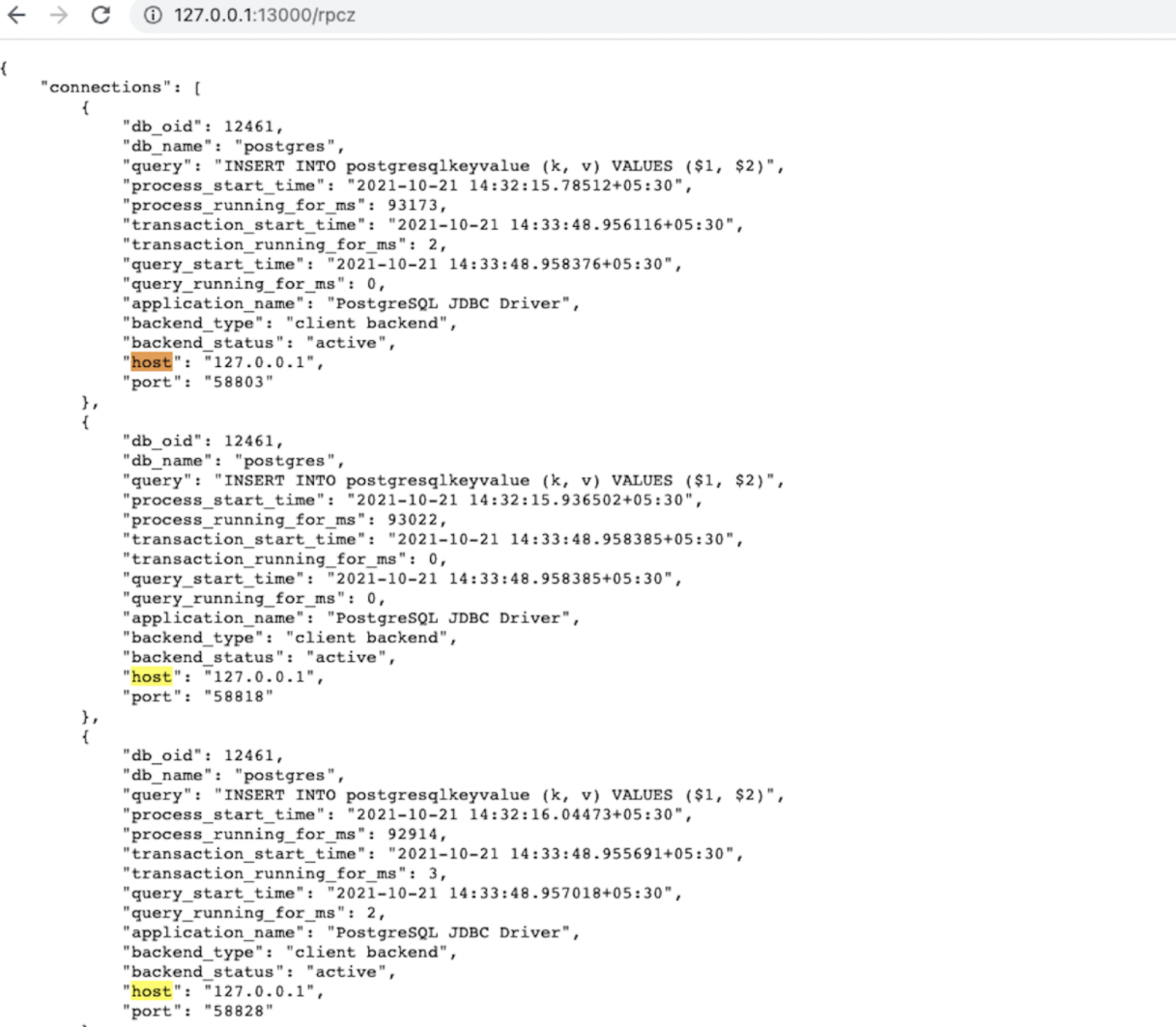
The application creates 30 connections. To verify the behavior, wait for the app to create connections and then visit http://<host>:13000/rpcz from your browser for each node to see that the connections are equally distributed among the nodes. This URL presents a list of connections where each element of the list has some information about the connection as shown in the following screenshot. You can count the number of connections from that list, or simply search for the occurrence count of the host keyword on that webpage. Each node should have 10 connections.

You can also verify the number of connections by running the following script in the same terminal:

from psycopg2.policies import ClusterAwareLoadBalancer as lb
obj = lb()
obj.printHostToConnMap()

This displays a key value pair map where the keys are the host and the values are the number of connections on them (This is the client side perspective of the number of connections). Load balancing with host connections
Check Topology-aware load balancing using yb-sample-apps

For topology-aware load balancing, run the following script in your new Python terminal with the topology_keys property set to aws.us-west.us-west-2a; only two nodes will be used in this case.

import psycopg2
conns = []
for i in range(30):
    conn = psycopg2.connect(user = 'username', password='xxx', host = 'hostname', port = 'port', dbname = 'database_name', load_balance='True', topology_keys='aws.us-west.us-west-2a')
    conns.append(conn)

To verify the behavior, wait for the app to create connections and then navigate to http://<host>:13000/rpcz. The first two nodes should have 15 connections each, and the third node should have zero connections. You can verify this as well by running the previous verify script in the same terminal.

Clean up

When you're done experimenting, run the following command to destroy the local cluster:

./bin/yb-ctl destroy

Further Reading

To learn more about the driver, you can read the architecture documentation.

  • Load balancing
  • Quick Start
  • Download the Driver Dependency
  • Fundamentals
    • Load balancing connection properties
  • Use the driver
  • Try it out
    • Install YugabyteDB and create a local Cluster
    • Check Uniform load balancing
    • Check Topology-aware load balancing using yb-sample-apps
  • Clean up
  • Further Reading
Ask our community
  • Slack
  • Github
  • Forum
  • StackOverflow
Yugabyte
Contact Us
Copyright © 2017-2022 Yugabyte, Inc. All rights reserved.